Attma Logo
    Attma Flow
    • Data & governance

      • DataOrganize, find, and share research files with version history.
      • RegistryBuild sample sheets that link lab records to their sequencing files.
      • CuratePrepare reviewed single-cell datasets for your workspace catalog.
      • WardSet workspace protection and define permitted uses for file versions.

      Analysis & review

      • WorkflowsRun installed pipelines with versioned inputs and reviewable results.
      • PodsStart a browser-based compute environment for interactive analysis.
      • PlotsTurn workspace data into interactive charts, notebooks, and Apps.
      • ClinicalReview variant evidence and sign versioned research reports.

      Workspace & connections

      • AgentsAsk about your workspace and follow answers back to their sources.
      • WorkspacesOrganize your team’s projects and manage who can use them.
      • IntegrationsConnect approved lab systems, storage, and warehouse sources.
      Platform overview
    • Clinical
    • Agents
    • Science
    • Pricing
    Research agentLog inGet started
    Explore the platform
    Attma Clinical

    Put the evidence next to every review.

    Review research variants with available source records and assessed criteria in view. Authorized scientists can sign a versioned research report and keep amendments traceable.

    Book a demo Sign in to open Clinical
    app.attma.bio/clinical/cases
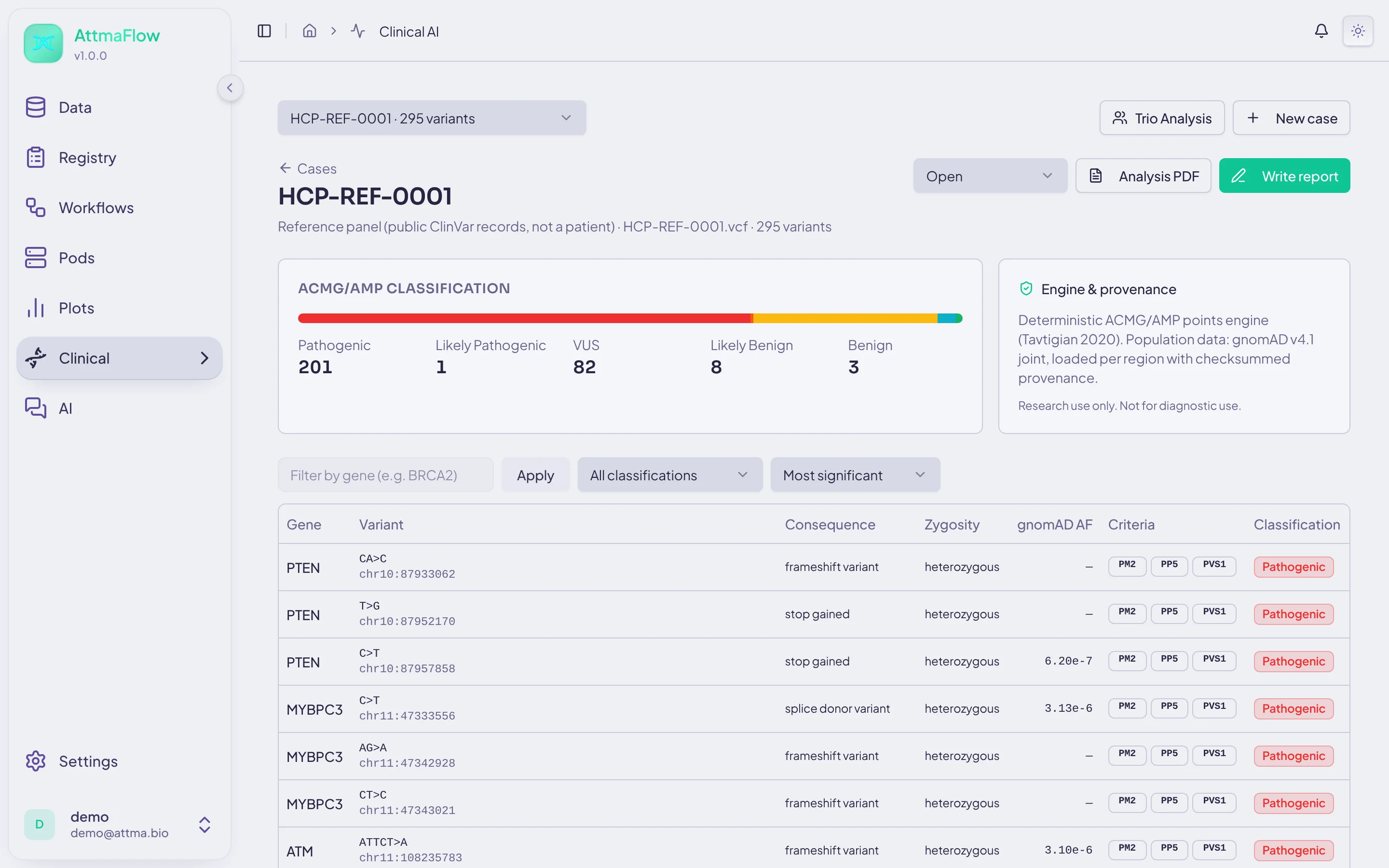
    Attma clinical case workspace with ACMG/AMP classification distribution and variant table
    • Start from a known input

      Start with an accepted GRCh38 VCF or the exact available Data version for the same workspace.

    • See what supports a classification

      Review assessed criteria, the reference evidence that was available, and observations marked as unassessed.

    • Keep a history of the signed review

      Authorized scientists sign a saved research revision. Open an amendment when findings change and preserve the earlier signed version.

    For research use. Diagnostic decisions require an independently validated laboratory process.

    Example workflow

    Take a research case from VCF to signed review

    1. Start with an approved VCF

      Import a supported GRCh38 file or select its available version in Data.

    2. Review what was assessed

      Inspect the criteria, reference coverage, and evidence gaps for the case.

    3. Record the research review

      An authorized scientist signs the saved revision. Amendments keep the earlier version.

    The case history connects the input, evidence review, and signed report version.

    Where Clinical fits

    • Attma DataFind the exact VCF version used in a research case.
    • Attma WardSet file-version use restrictions for governed research data.

    Walk through a research case review

    Book a demo Read the Clinical guide
    Attma Logo
    Attma Flow

    A shared workspace for genomics research, analysis, and evidence review.

    martin@attma.bio

    Platform

    • Clinical
    • Agents
    • Data
    • Platform overview

    Company

    • Science
    • Pricing
    • Book a demo

    Account

    • Sign in
    • Create account
    Resources
    • Product guides
    • Developer quickstart
    • Frequently asked questions
    • Privacy Policy
    • Notice to European Users
    • Terms of Service

    © 2026 Attma Flow. All rights reserved.

    Attma supports research and laboratory workflows. Interpretations require review and sign-off by a qualified clinical scientist.